顯示具有 Robotics 標籤的文章。 顯示所有文章

2011年4月5日 星期二

Using an Bluetooth to RS-232 Converter for Robotics Use

Not much of an update this week, but we found something that can be really useful to us roboticists.  RS-232 is still a pretty standard interface among sensors for robotics.  In fact, much of the instrument drivers included in the LabVIEW Robotics Module are for RS-232 sensors (Hokuyo, Crossbow IMU, Garmin GPS etc.)  Well, what if you didn’t want to tether your sensor to your PC or CompactRIO?  Much like how you can replace ethernet with wifi, you can also replace tethered RS-232 with an off-the-shelf Bluetooth-RS232 converter.  Here’s a short video of us using this in a Hokuyo LIDAR setup.

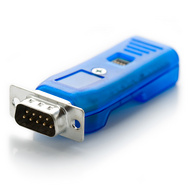
If you are in the US, you can grab one of these converters off of sparkfun.com:

Bluetooth Modem - Roving Networks RS232

Once your bluetooth-equipped PC scans and finds this device, your PC adds an additional COM port to your device manager.  Run your RS-232 programs as before, and you will now have a wireless link to your RS-232 device.

A few things to note:

1. You can manipulate the Bluetooth converter to run at your specified baud rate.  Remember, the baud rate of the sensor, the BT converter, and the BT COM port on your PC all have to be the same.  However, we did notice slower data transfer, even at the same baud rate (running a Hokuyo LIDAR at 115.2kbps.)  Just like how wifi doesn’t actually achieve transfer speeds like regular ethernet, this BT converter will have an effect on your transfer speed as well.

2. This Sparkfun unit has a RS-232 driver built in, so you don’t need to add another voltage converter for RS-232.  See this tutorial to learn why you need a driver/voltage converter.

Seattle Robotics, Project: RS-232 to TTL cable

As always, keep your feedback coming!

-John

2011年3月5日 星期六

LabVIEW, Xbox Kinect, and 3D point cloud visualization

ttt

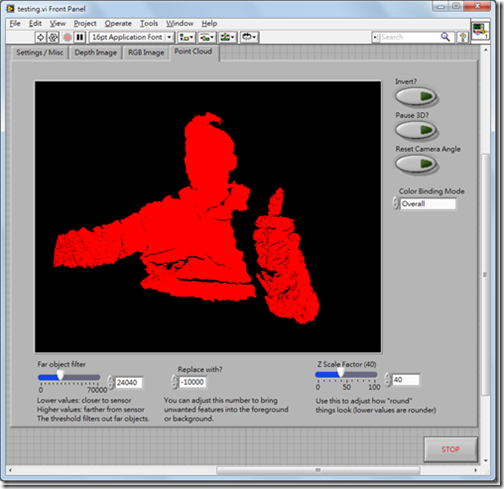
Lately there has been alot of buzz about the Microsoft Kinect accessory, especially within the area of mobile robotics.  Imagine, a 3D scanner for not 2000 USD, but 200 USD!  Well, if you already happen to use LabVIEW, things just got a little easier.

This post is actually a response to the great work that Ryan Gordan has been doing over at his blog, http://ryangordon.net/.  Ryan’s already put up a LabVIEW wrapper for the OpenKinect library … if he had not done this, my experimentation would not have been possible.  So, kudos to Ryan.

You can get started pretty fast using Ryan’s LabVIEW example – grabbing the RGB image, 11-bit depth image, and accelerometer data off of the kinect.  I know that other people have gone on to using the kinect for 3D scene reconstruction (i.e. MIT), I was just curious if LabVIEW could do the same.  So, after some google searching, I found a LabVIEW point cloud example and combined that with Ryan’s example code.  Here’s how to get started:

1. Get your kinect connection up and running first.  Ryan has included inf files on his site, I have as well in my download link.  Be sure to install Microsoft Visual C++ 2010 Redistributable Package.  Check http://openkinect.org/wiki/Getting_Started for more information.

2. Run Ryan’s example.vi first to get a feel of how the program works.  It’s the typical, but very handy, open –> R/W –> close paradigm.

3. Now open up Kinect Point Cloud.vi.  The tabs on the top still have your depth image and RGB image, but now I’ve added a point cloud tab.

image

image

ttt

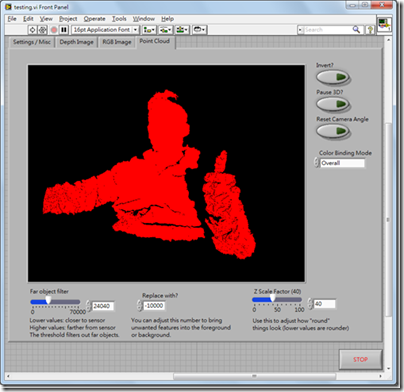
4. There are some options that you can adjust while in the point cloud tab.  There is a filter that lets you remove far objects, you can adjust the threshold on the lower left.  “Invert” is to turn the 3D inside out, pause 3D holds the current 3D view, and in case you lose the mesh while scrolling around in the 3D view, use the reset camera angle button.  BTW, use your left mouse button to rotate the 3D view, hold down shift to zoom in/out, and hold down ctrl to pan.

5. If you choose color binding mode to be “per vertex”, something interesting happens:

image

You can map the RGB values to the 3D mesh!  Obviously there is some calibration needed to remove the “shadow” of the depth image, but that’s something to fiddle with in the future.

6. For those of you who care, I’ve modified Ryan’s “get RGB image” VI and “get depth image” VI so that they output raw data as well.  Just wanted to clarify if case your subVIs don’t match up.

The idea behind displaying the 3D mesh is pretty simple, it’s alot like the pin art toy you see in Walmart:

The kinect already gives you the z-values for the 640x480 image area, the LabVIEW program just plots the mesh out, point by point.  I had wanted to use the 3D Surface or 3D Mesh ActiveX controls in LabVIEW, but they were just too slow for real-time updates.  Here is my code in LabVIEW 8.6, I’ve bundled Ryan’s files with mine so you don’t have to download from two different places.  Enjoy!

Download: LabVIEW Kinect point cloud demo

Things to work on:

I am a bit obsessive about the performance of my LabVIEW code.  For those of you who noticed, the 3D display will update slower if you choose “per vertex” for color binding.  This is because I have to comb through each of the 307,200 RGB values that was already in a 3-element cluster and make it into a 4-element RGBA cluster so that the 3D SetMeshParms node can take the input with an alpha channel.  If any of you know how to do this in a more efficient way, please let me know!  This really irks me, knowing that I’m slowing down just to add a constant to an existing cluster.image
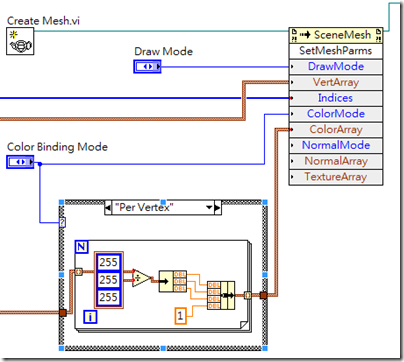
I have also seen other 3D maps where depth is also indicated by a color gradient, like here.  I guess it wouldn’t be hard to modify my code, it’s just some interpolation of color to the depth value.  But that’s a little tedious to code, I prefer spending more of my time playing with 3D models of myself!  (Uh, that sounded weird.  But you know what I mean.)

A little about me:

My name is John Wu, I’ve worked at National Instruments Taiwan for about six years, now I’m at a LabVIEW consulting company called Riobotics, where we develop robots with LabVIEW not only for fun, but also for a living!  Please leave your comments and feedback, I’d love to hear from you.

-John

2011年1月25日 星期二

會馬殺雞的機器人─WheeMe


文章來源:Yahoo!奇摩 發表時間:2010/12/03

會馬殺雞的機器人─WheeMe

當你倒臥在沙發上看電視、或趴在軟墊上聽音樂時,如果有人貼心地幫你按摩一下,那肯定是種無上的享受。當然,如果有人願意做這件事,那是再好不過了;假如眼前沒有這樣的志願者,別擔心,就讓機器人來幫你按摩一下吧!

WheeMe是個會讓你通體舒暢的機器人

別以為這時候會走出一個巨大的人形機器來虐待你,畢竟如同某手機大廠的名言:科技始終來自於人性。由DreamBots公司所推出的WheeMe,是個手掌般大小、有如可愛小瓢蟲一般的機器人,它能在你的背上或腹部四處遊走,以十分溫柔與緩慢的速度,很有耐心地按摩它所經過的每一個地方;在為你服務的時候,WheeMe會十分地安靜,而且你也不必擔心它會摔落到地面,因為在斜度過大的地方,它會自己倒退回安全處。

三顆3號電池就可以驅動WheeMe

或許你會以為,WheeMe是以自身的重量來產生按壓的效果;其實WheeMe並不重,只有300多克而已。它之所以能夠讓你通體舒暢,主要是它會產生震動,並透過輪子上的薄片施壓,產生按摩的作用。官方表示,WheeMe適用於身體上有著大塊平面的部分,像是你的背部或是腹部等位置。WheeMe的動力是來自於三顆3號電池,因此沒有電線等惱人的束縛。而這玩意兒也不需要搖控器,因為它會隨機性地四處遊走,因此並不需要另一個人協助操作。而且保養的方式也很簡單,只要用乾布清潔一下輪子就可以了。

不需要別人幫忙,WheeMe就能幫你按摩

在官網釋出的見證影片中,每個試用者都笑開懷;雖然我們難以體會實際的效果,不過這樣的按摩機器人還是蠻討喜的。心動嗎?明年初就會正式開賣了唷~

圖片來源:DreamBots公司官網

2010年11月7日 星期日

TIROS 2010 機器人展覽照片

上個月除了機器人競賽圓滿落幕以外,TIROS展覽這邊我們倒是看到蠻多各式各樣的機器人,在這邊John把私藏的圖片放下來給大家看,等之後有時間再一個一個跟大家好好講解吧!

tiros-05 tiros-07 tiros-09 tiros-13 tiros-14 tiros-16 tiros-21 tiros-22 tiros-23 tiros-24 tiros-27 tiros-32 tiros-33 tiros-34 tiros-42 tiros-01 tiros-02 tiros-03

-John

2010年6月19日 星期六

三分鐘挑選最適合機器人應用的CompactRIO模組

時常我會被問到:「咦,吳先生啊,CompactRIO有那麼多的模組可以選擇,可是反而選擇越多,我越覺得麻煩,可不可以推薦幾款模組是機器人應用常會被用到的?」

image 

的確,NI的CompactRIO模組有分很多種型號(現在已經有超過60幾種可以選),要選擇最適合的組合也不是一件很容易的事,有時候也要看應用的需求,想接哪種sensor,馬達,驅動器等等…在此提供一些選擇CompactRIO模組的準則,希望能夠幫大家節省一些困難。我們先從一些基本的模組分類來看:

  • Analog Input (AI,類比輸入)
  • Analog Output (AO,類比輸出)
  • Digital Input/Output (DIO,數位輸入/輸出)
CompactRIO I/O Modules

AI篇:

自主性機器人可能會用到的類比sensor有包含MEMS加速規,陀螺儀,紅外線,超音波…只要sensor本身有提供類比電壓的訊號,我們都可以用AI模組把訊號抓進來到CompactRIO。有幾個基本款可以跟大家推薦: NI 9215 (4個通道,100kS/s,16-bit) 或 NI 9201(8個通道,*500kS/s,12-bit。) 這兩款價錢差不多一樣,一個是通道數比較少,解析度比較高,另外一個則是通道數比較多,解析度只有到12-bit。如果sensor是比較精密的感測器(像MEMS加速規或陀螺儀),我會推薦 9215,如果沒有這方面的需求那9201還蠻適合一般機器人的應用。如果預算比較充裕的話,甚至可以考慮NI 9205 (32個通道,*250kS/s,16-bit) ,它就可以一次提供更多的通道數以及16-bit的解析度。

*備註: 9201和9205的sample rate是所有AI通道共享的,就拿9205來看,如果只需要一個channel它則可以跑到250kS/s,但是如果32個channel全部跑的話,那最高sample rate只能跑到7.8kS/s,請注意。不過以機器人應用來講,通常sample rate有1k-5k就綽綽有餘了。

AO篇:

再來就是AO的部份,還好AO的選擇就沒有那麼複雜,我推薦的AO模組會是NI 9263,有4個100kS/s的電壓輸出通道,可以直接拿來接到溫控器,速度控制模式的馬達,以及其它需要類比電壓控制的儀器。如果需要更多AO通道,那麼還有NI 9264可以考慮,它有16個AO通道,雖然價錢是9263的一倍,但是以cost per channel的比例來看的話會是比較划算。通常除非客戶已經知道會需要那麼多通道的話,一般我還是推薦NI 9263。

DIO篇:

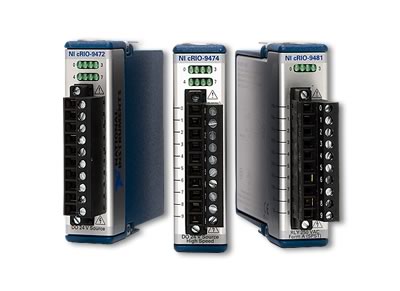
至於DIO的話,一般機器人應用最需要的電壓準位大部份為5V,12V,和24V。如果只需要單純的5V DIO,那NI 9403(32個通道DIO,5V)會是不錯的選擇 不過,如果需要同時接馬達的編碼器encoder還有pulse訊號的sensor的話,我反而會推薦NI 9401(8個通道DIO,5V)。為什麼要犧牲通道數呢? 因為9401除了單純的DIO功能以外,它還可以配合LabVIEW Scan Mode設定為有counter功能的模組,非常方便。要用NI 9403達到同樣功能不是不行,只不過是要自己寫FPGA code,對於初學者來講會比較困難。至於輸出的部份,我會推薦NI 9472(8個高達24V的輸出通道)。9472可以接收一個外部DC電源,外部電源的電壓是多少,9472送出來的數位訊號就會以這個DC電壓為準。同樣的,如果需要更多輸出通道的話,可以選擇NI 9476 (32個高達24V的輸出通道。)

所以嘍,總而言之,這裡是John的CompactRIO首選模組總結:

image 

模組類別

最經濟實惠

預算充裕

AI

9201

9205

AO

9263

9264

DI

9401

9401

DO

9472

9476

這樣一來,各位就不用為該選哪些模組傷腦筋,我們可以有更多的時間來寫LabVIEW!

-John
2010年6月13日 星期日

RST 2010 大專盃 機器人移動平臺 Demo

這個週末外面都在下雨,哪兒都不能去,不過還好有機器人陪伴著我…

最近已經寫好了一些LabVIEW控制RST機器人平臺的範例程式,等我整理一下之後,就會將這些程式碼公佈出來,希望能夠提供今年要參加機器人競賽一些參考的基礎。沒想到這個平臺控制起來還蠻順的 … 請看以下影片:


接下來如果有時間的話,會陸續整理一個「非官方使用手冊」,這樣一來大家就可以站在同個起跑點了!

-John

2010年1月19日 星期二

國防創新科技 戰場機器人曝光!

負責國軍研發新科技的中科院,一向帶有神祕面紗,外界很難窺探,今天中科院難得對外公開展示最新成果,包括戰場機器人,無人偵查機,還有新式防水軍靴。


原始聯結:

http://news.cts.com.tw/cts/general/201001/201001190392324.html

2009年12月7日 星期一

向軍事用途機器人致敬

最近在研究一些軍事用途機器人,發現網路上還蠻多影片的,想跟大家分享一下:

機器人用在戰場上的一些好處:

1. 不怕子彈,砲火

2. 不會臨時逃跑

3. 不需要照顧它的伙食

4. 不會跟長官頂嘴


Packbot: 找出賓拉登藏身處的機器人,現在正在阿富汗服役

Big Dog: 怎麼踢也不會倒的四足機器人

SARCOS: 機器強化人體骨架 (阿諾你給我小心一點)

TALON: 遙控坦克加裝衝鋒槍

2009年8月17日 星期一

機器人直昇機可在房子內自己找路

有趣的應用,大家可以參考參考 :-)

機器人直昇機可在房子內自己找路

2009年08月17日

正當你或許已經習慣讓無人飛機飛越自己所居住的城市這樣的想法時,他們已經開始進入到住宅裡了。

這台機器人直昇機是由一個美德合作的團隊設計出來的,最近贏得了一項競賽,這項競賽給的考題是,必須在一個模擬的核能發電廠內不借助全球衛星導航系統(GPS)的幫忙「自我導航」,然後找到核電廠內的控制面板並拍下照片。

Pelican是以由德國新興公司Ascending Technologies所設計的硬體為基礎,再搭配麻省理工學院(MIT)一個研究團隊所開發的軟體,在試了四次之後終於成功完成了它的任務,離限定時間結束只差一點點。它在國際航空機器大賽 (International Aerial Robotics Competition)裡贏得了一萬美元的獎金。

Pelican 是一台微型飛機(MAV),採用「4旋轉翼」的設計,以碳纖維骨架搭配4個螺旋槳,可透過有效範圍32碼的雷數掃描器與立體照相機將走廊與房間的分佈情形建構出來,並透過無線網路將自己進度傳輸給場外的電腦。位置與地圖的建構軟體是MIT 團隊提供的。

已經邁入第二十個年頭的IARC競賽規模雖小卻彌足珍貴,它涉及了一些目前在軍事或其他領域所無法達成的技術。微型飛機們的下一個任務(第六趟)是潛入一個模擬的有安全系統的建築物,偷出一個快閃記憶體隨身碟並用一個無用之物取代它,之後在未被察覺的情況下安全離開。

幸好目前微型飛機受到螺旋槳噪音的影響聽起來仍像是有一千隻蚊子在飛,否則所有的間諜都要因它們而失業了。


原始聯結: http://taiwan.cnet.com/crave/0,2000088746,20140224,00.htm

2009年8月10日 星期一

全國機器人賽 台大大贏家

各位如果有機會參加上禮拜的 TIROS 機器人大展,想必應該有注意到一些很精彩的機器人競賽! 這些參賽組應該都為了這些競賽忙翻天了 … 讓我們為他們好好加油吧!

全國機器人賽 台大大贏家

2009/08/10

【聯合報╱記者湯雅雯/台北報導】

全國機器人競賽,台大機械系碩博士班學生等六人,設計「亞當」機器人,整合辨認顏色技術,一路過關斬將,勇奪40萬第一大獎。 圖/主辦單位提供

「2009全國機器人競賽」昨天頒獎,多達147組學生參賽,爭奪高達318萬元總獎金,原訂在父親節舉辦頒獎典禮,因受莫拉克颱風影響,順延至昨天,台大仍是最大贏家,勇奪三項大獎冠軍。

今年的全國機器人大賽有別以往,整合居家服務型機器人、智慧機器手臂、保全機器人三大主題賽事。智慧機器手臂實作競賽部分,今年有台大、成大等17組隊伍晉級,最後由台大機械工程系團隊的「亞當」智慧機器手臂奪冠,贏得最高獎金40萬元。

台大電機系林瑜智(左起)、鄭文豪、吳世強與林詩碩研發的機器人「藍波」,獲居家服務型機器人首獎。 記者陳立凱/攝影

「亞當」(ADAM)機器人手臂由台大機械系實驗室碩博生王仁政、陳嘉宏、嚴舉樓、黃子豪、王唯任共同設計。隊長王仁政說,他們整合辨色技術及視訊等人機介面,展現靈活穩定的機器手臂操作,「亞當一路過關斬將,脫穎而出。」

機器手臂競賽分成四關,第一關「手舞足蹈」,參賽隊伍自選一首歌並設計作品舞蹈表演,王仁政說,他選了基因合唱團的外國歌曲加電音組曲,展現「亞當」靈活、高難度的手臂舞蹈,廣獲評審好評。

第二關「舉足輕重」,參賽隊伍必須於時間內,將不同重量的啞鈴搬運至指定區,王仁政表示,為了訓練「亞當」提重物能力,賽前不斷測驗,前一周才換了一顆馬達,「輕而易舉搬運500克至3公斤的重物。」

第三關「機械揮毫」,機器手臂必須抓取麥克筆寫字,亞當也是輕鬆過關;第四關「眼明手快」,機器手臂必須在最短時間內,抓取4種不同顏色的球,王仁政說,此關難度最高,必須整合辨認顏色技術,機器手臂才不會出錯。

原始聯結:

http://mag.udn.com/mag/campus/storypage.jsp?f_MAIN_ID=11&f_SUB_ID=3022&f_ART_ID=207404

2009年8月4日 星期二

GSD Product Design Contest (Update)

After launching this contest in early June, we have had a signifigant number of entry submissions from both academic and industry.  Just 2 weeks ago, we have held a training camp for the 9 teams who made it past the first round eliminations.  Before we go into the details of the camp, let’s recap the contest objectives for this year:

The 2009 GSD Challenge

“Realizing the Robotics Dream”

Engineers, researchers, and educators have been using LabVIEW and CompactRIO to create robots such as autonomous vehicles, humanoid robots, fixed-base industrial robots, and personal/home service robots around the world. The fast development and prototyping capabilities, tight-integration to I/O, ruggedness, powerful embedded processing are all critical needs for many robotics applications. Being an open platform, CompactRIO has the capabilities to serve a wide variety of robotics applications through many readily available I/O modules and custom-designed modules.

The challenge this year is to design, prototype and deploy a Custom CompactRIO module solving a robotics application. Take this product from conception to finish and eventually market and sell this product in the marketplace.

Here's some info and pics and the camp we just ran a couple weekends ago.  The agenda was mainly a Multisim/Ultiboard hands-on session, intro to LabVIEW FPGA, plus a few more talks about entrepreneurship from guest speakers with past start-up experiences.

You can check out our webpage here:

http://www.gsd-contest.com.tw/2009/titbits_list.php

Also, an online video:

Right now, these are the designs that the teams are committed to doing:

  • An I2C, SPI, and RS-485 interface module
    A module with a embedded gyro compass
    MEMS accelerometer module
    Zigbee communication module
    Navigation module for UAVs
    Muscle signal acquisition module
    Brain wave signal acquisition module
    Maximum power tracking module for solar cell optimization
    A module with a embedded CMOS camera

Let’s wish them the best of luck, because it’s going to be an intense and exciting showdown at the finals on 11.25.2009!

模組開發培訓營Day 1 精彩實錄

經過評審群們挑選後,終於挑選出九組團隊,晉級參加接下來的比賽。在 7/18 7/19 這兩天,主辦單位特別為這九組成員舉辦的技術培訓營。

現在就由照片帶領我們大家一起回到這兩天的時光吧!

身為評審群之一的 John,現身營隊,恭喜所有隊員,並和大家一起度過這兩天一夜的活動

大家的自我介紹充滿了創意,有精采的Video,也有充滿詼諧幽默的團隊名稱

技術講座就由帥氣的講師Aaron 開始。

大家彼此認真的討論技術問題...

結束了一整天的技術講座,來點佛朗明哥舞醒醒神吧!

精彩的 Team Building 來囉~ Video 點選此處 連結觀賞